
library(YouAnalyser)
#>
#> ── Welcome to YouAnalyser! ─────────────────────────────────────────────────────
#> ✔ Package loaded successfully!
#> Type `?YouAnalyser` to see the documentation.
#> Visit the package's website for more information:
#> <https://eguizarrosales.github.io/YouAnalyser/>
library(haven)
Exploratory Data Analysis (EDA)
It is good practice to start with an exploratory data analysis (EDA)
to understand the structure of the data, check for missing values, and
identify any potential issues before performing Key Driver Analysis
(KDA). YouAnalyser provides conventient functions for EDA,
all starting with eda_: eda_summary() and
eda_correlations(). These functions can help you get a
quick overview of your data and identify any necessary preprocessing
steps. But first, we need some data!
Reading in the data
Note that the data should be in [haven::labelled()] format for
YouAnalyser to work properly, which is common for survey
data. If your data is in a different format, you may need to convert it
before using YouAnalyser.
We start by loading the data. The YouAnalyser package
includes a sample dataset called bwk.sav, which is in SPSS
format. You can read in your own dataset using the
haven::read_sav() function, e.g.:
myOwnData <- haven::read_sav("path/to/your/ownFile.sav")We can read in the included sample dataset as follows:
example_data <- haven::read_sav(system.file(
  "extdata",
  "bkw.sav",
  package = "YouAnalyser"
))

# This will be equivalent to `example_data <- YouAnalyser::bkw_missings` but using `haven::read_sav()` allows us to see how to read in our own data in the same format.
example_data contains our outcome variable
F600 and 14 predictor variables F800_1 to
F800_14. To get more information about this included
dataset, you can run ?YouAnalyser::bkw_missings in the R
console:
help(YouAnalyser::bkw_missings)We will select only the variables of interest:
Get a summary of the data
The eda_summary() function provides a summary of the
data, including the number of observations, number of missing values,
and basic statistics for each variable. This can help you understand the
distribution of your data and identify any potential issues.
eda_summary(example_data)This will open a new browser window with the summary of the data that will look something like this:
#> Warning: no DISPLAY variable so Tk is not available
#> Warning in png(png_loc <- tempfile(fileext = ".png"), width = 150 *
#> graph.magnif, : unable to open connection to X11 display ''
#> Warning in png(png_loc <- tempfile(fileext = ".png"), width = 150 *
#> graph.magnif, : unable to open connection to X11 display ''
#> Warning in png(png_loc <- tempfile(fileext = ".png"), width = 150 *
#> graph.magnif, : unable to open connection to X11 display ''
#> Warning in png(png_loc <- tempfile(fileext = ".png"), width = 150 *
#> graph.magnif, : unable to open connection to X11 display ''
#> Warning in png(png_loc <- tempfile(fileext = ".png"), width = 150 *
#> graph.magnif, : unable to open connection to X11 display ''
#> Warning in png(png_loc <- tempfile(fileext = ".png"), width = 150 *
#> graph.magnif, : unable to open connection to X11 display ''
#> Warning in png(png_loc <- tempfile(fileext = ".png"), width = 150 *
#> graph.magnif, : unable to open connection to X11 display ''
#> Warning in png(png_loc <- tempfile(fileext = ".png"), width = 150 *
#> graph.magnif, : unable to open connection to X11 display ''
#> Warning in png(png_loc <- tempfile(fileext = ".png"), width = 150 *
#> graph.magnif, : unable to open connection to X11 display ''
#> Warning in png(png_loc <- tempfile(fileext = ".png"), width = 150 *
#> graph.magnif, : unable to open connection to X11 display ''
#> Warning in png(png_loc <- tempfile(fileext = ".png"), width = 150 *
#> graph.magnif, : unable to open connection to X11 display ''
#> Warning in png(png_loc <- tempfile(fileext = ".png"), width = 150 *
#> graph.magnif, : unable to open connection to X11 display ''
#> Warning in png(png_loc <- tempfile(fileext = ".png"), width = 150 *
#> graph.magnif, : unable to open connection to X11 display ''
#> Warning in png(png_loc <- tempfile(fileext = ".png"), width = 150 *
#> graph.magnif, : unable to open connection to X11 display ''
#> Warning in png(png_loc <- tempfile(fileext = ".png"), width = 150 *
#> graph.magnif, : unable to open connection to X11 display ''
#> Warning in png(png_loc <- tempfile(fileext = ".png"), width = 150 *
#> graph.magnif, : unable to open connection to X11 display ''
#> Warning in png(png_loc <- tempfile(fileext = ".png"), width = 150 *
#> graph.magnif, : unable to open connection to X11 display ''
#> Warning in png(png_loc <- tempfile(fileext = ".png"), width = 150 *
#> graph.magnif, : unable to open connection to X11 display ''
#> Warning in png(png_loc <- tempfile(fileext = ".png"), width = 150 *
#> graph.magnif, : unable to open connection to X11 display ''
#> Warning in png(png_loc <- tempfile(fileext = ".png"), width = 150 *
#> graph.magnif, : unable to open connection to X11 display ''
#> Warning in png(png_loc <- tempfile(fileext = ".png"), width = 150 *
#> graph.magnif, : unable to open connection to X11 display ''
#> Warning in png(png_loc <- tempfile(fileext = ".png"), width = 150 *
#> graph.magnif, : unable to open connection to X11 display ''
#> Warning in png(png_loc <- tempfile(fileext = ".png"), width = 150 *
#> graph.magnif, : unable to open connection to X11 display ''
#> Warning in png(png_loc <- tempfile(fileext = ".png"), width = 150 *
#> graph.magnif, : unable to open connection to X11 display ''
#> Warning in png(png_loc <- tempfile(fileext = ".png"), width = 150 *
#> graph.magnif, : unable to open connection to X11 display ''
#> Warning in png(png_loc <- tempfile(fileext = ".png"), width = 150 *
#> graph.magnif, : unable to open connection to X11 display ''
#> Warning in png(png_loc <- tempfile(fileext = ".png"), width = 150 *
#> graph.magnif, : unable to open connection to X11 display ''
#> Warning in png(png_loc <- tempfile(fileext = ".png"), width = 150 *
#> graph.magnif, : unable to open connection to X11 display ''
#> Warning in png(png_loc <- tempfile(fileext = ".png"), width = 150 *
#> graph.magnif, : unable to open connection to X11 display ''
#> Warning in png(png_loc <- tempfile(fileext = ".png"), width = 150 *
#> graph.magnif, : unable to open connection to X11 display ''| Variable | Label | Stats / Values | Freqs (% of Valid) | Graph | Missing | |||||||||||||||||||||||||||||||||||
|---|---|---|---|---|---|---|---|---|---|---|---|---|---|---|---|---|---|---|---|---|---|---|---|---|---|---|---|---|---|---|---|---|---|---|---|---|---|---|---|---|
| F600 [haven_labelled, vctrs_vctr, double] | Wie attraktiv finden Sie die BKW als Arbeitgeberin? |
|
|
 |
2 (0.2%) | |||||||||||||||||||||||||||||||||||
| F800_1 [haven_labelled, vctrs_vctr, double] | Sicherheit und langfristige Stabilität des Arbeitgebers |
|
|
 |
1 (0.1%) | |||||||||||||||||||||||||||||||||||
| F800_2 [haven_labelled, vctrs_vctr, double] | Karriere- und Entwicklungsmöglichkeiten |
|
|
 |
5 (0.4%) | |||||||||||||||||||||||||||||||||||
| F800_3 [haven_labelled, vctrs_vctr, double] | Sinnvolle Tätigkeit und gesellschaftlicher Beitrag |
|
|
 |
2 (0.2%) | |||||||||||||||||||||||||||||||||||
| F800_4 [haven_labelled, vctrs_vctr, double] | Gute Zusammenarbeit und Teamkultur |
|
|
 |
1 (0.1%) | |||||||||||||||||||||||||||||||||||
| F800_5 [haven_labelled, vctrs_vctr, double] | Vereinbarkeit von Beruf und Privatleben |
|
|
 |
3 (0.2%) | |||||||||||||||||||||||||||||||||||
| F800_6 [haven_labelled, vctrs_vctr, double] | Moderne Arbeitsumgebung und Technologien |
|
|
 |
5 (0.4%) | |||||||||||||||||||||||||||||||||||
| F800_7 [haven_labelled, vctrs_vctr, double] | Attraktive Vergütung und Zusatzleistungen |
|
|
 |
4 (0.3%) | |||||||||||||||||||||||||||||||||||
| F800_8 [haven_labelled, vctrs_vctr, double] | Gute Führung und wertschätzende Unternehmenskultur |
|
|
 |
2 (0.2%) | |||||||||||||||||||||||||||||||||||
| F800_9 [haven_labelled, vctrs_vctr, double] | Verantwortung und Gestaltungsspielraum |
|
|
 |
3 (0.2%) | |||||||||||||||||||||||||||||||||||
| F800_10 [haven_labelled, vctrs_vctr, double] | Zukunftsorientierung und Nachhaltigkeit des Unternehmens |
|
|
 |
3 (0.2%) | |||||||||||||||||||||||||||||||||||
| F800_11 [haven_labelled, vctrs_vctr, double] | Internationales Arbeitsumfeld und kulturelle Vielfalt |
|
|
 |
5 (0.4%) | |||||||||||||||||||||||||||||||||||
| F800_12 [haven_labelled, vctrs_vctr, double] | Innovationskultur und Veränderungsbereitschaft des Unternehmens |
|
|
 |
2 (0.2%) | |||||||||||||||||||||||||||||||||||
| F800_13 [haven_labelled, vctrs_vctr, double] | Arbeitszeit- und Arbeitsortflexibilität |
|
|
 |
1 (0.1%) | |||||||||||||||||||||||||||||||||||
| F800_14 [haven_labelled, vctrs_vctr, double] | Diversität, Gleichstellung und Inklusion |
|
|
 |
6 (0.5%) |
Generated by summarytools 1.1.5 (R version 4.6.0)
2026-04-28
We see that there are 4307 missing values in the outcome and
predictor variables. Lets remove these missing values and save the new
dataset as example_data_clean:
example_data_clean <- example_data |>
  tidyr::drop_na()
Check correlations
We can also have a look at the correlation matrix of the variables
using the eda_correlations() function. This can help you
identify any potential multicollinearity issues among the independent
variables as well as the strength and directionof the relationships
between the independent variables and the dependent variable. High
correlations among independent variables can indicate multicollinearity,
which can affect the stability and interpretability of the KDA results.
Moreover, we would like to see that the independent variables are
correlated positivly with the dependent variable, as
KDA is based on the idea of identifying key drivers that have a positive
impact on the outcome.
corrs <- eda_correlation(example_data_clean, correlation_type = "pearson")A correlation matrix plot is saved in corrs$p, which
will look like this:
corrs$p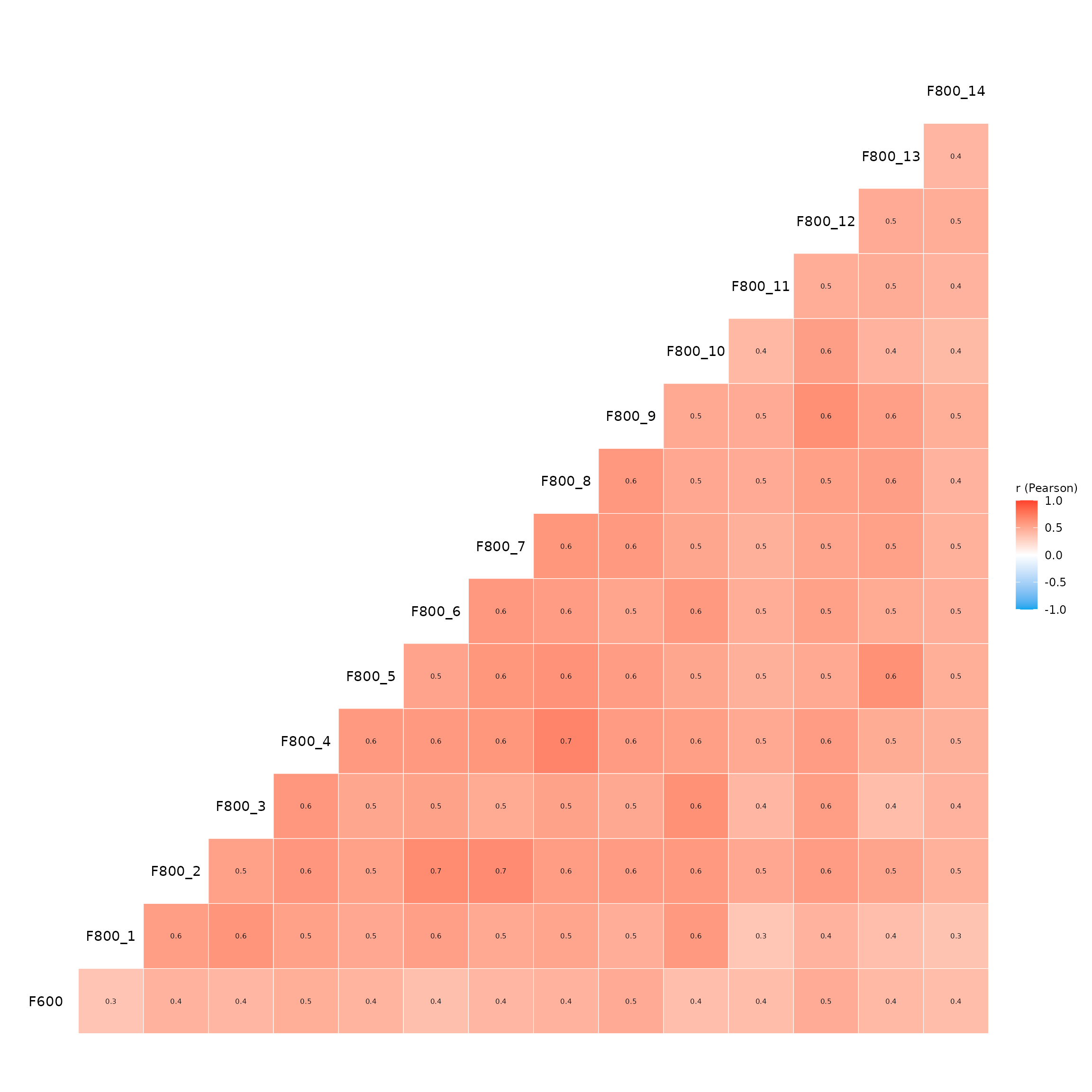
We see that there are some high correlations among the independent
variables, which may indicate multicollinearity. However, we also see
that all independent variables are positively correlated with the
dependent variable F600, which is a good sign for
performing KDA.
Key Driver Analysis (KDA)
Now the real fun starts! [YouAnalyser::kda_regression()] is the main function for performing Key Driver Analysis. There are two ways to use this function: (1) by providing the raw data and specifying the outcome variable and predictor variables, or (2) by providing a fitted model object. The first approach is more straightforward and is recommended for most users, while the second approach allows more advanced users to use some shortcuts, as we will show below.
The recommended approach in its minimal form looks like this:
kda <- kda_regression(
  data = example_data_clean,
  outcome = "F600",
  predictors = paste0("F800_", 1:14)
)
Alternatively, we can first fit a model and then provide the fitted
model object to [YouAnalyser::kda_regression()]. This for instance
allows for short cuts like outcome ~ . in the model
formula. If you do not recognize this syntax, it is perfectly fine to
ignore it and use the first approach as shown above. The second approach
would look like this:
myModel <- lm(F600 ~ ., data = example_data_clean)
kda <- kda_regression(model = myModel)
Note that it is only possible to use models fitted with
lm() and glm() without interaction terms!
(Interactions make it very difficult to calculate usefull importance
measures for KDA).
It is highly recommended to have a look at the help documentation of
[YouAnalyser::kda_regression()] to see all the different options for
performing KDA, including different methods for calculating importance
measures and different ways to visualize the results as well as all the
available output. You can access the help documentation by running
?YouAnalyser::kda_regression in the R console.
Let’s have a look at the different outputs generated by [YouAnalyser::kda_regression()]: